
To deposit using the bank transfer option, kindly follow the steps below:
Step 1: Login to your MSport account
Step 2: Click on the “Me” column at the top right side of the web page where you have your balance
Step 3: Click deposit and select “bank transfer”
Step 4: On the next page displayed, forward your fund to the WEMA bank account number displayed on the screen
Step 5: Once you have successfully made the transfer, click on I HAVE SENT THE MONEY and the upper left “X” button to close the Paystack page.
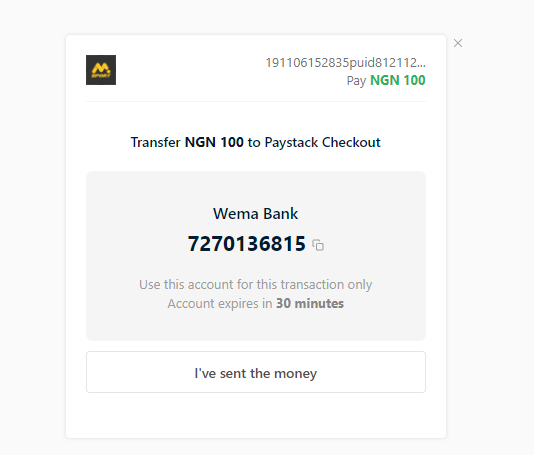
Step 6: Click on the MSport logo at the top of the page to return to the homepage to view your balance.
Comments
35 comments
I do all this but it didn't reflect
I'm having issues
Dear Customer, Thanks for reaching out to us. For the customer service issues, kindly contact us through our 24/7 Live chat through our website https://www.msport.com/ng/support/about/contact-us?chat=1. Have a nice day.
I can't debited
Dear Customer, Thanks for reaching out to us. For the customer service issues, kindly contact us through our 24/7 Live chat through our website https://www.msport.com/ng/support/about/contact-us?chat=1. Have a nice day.
Please sign in to leave a comment.